iOS Audio Streaming ด้วย AVAssetResourceLoader

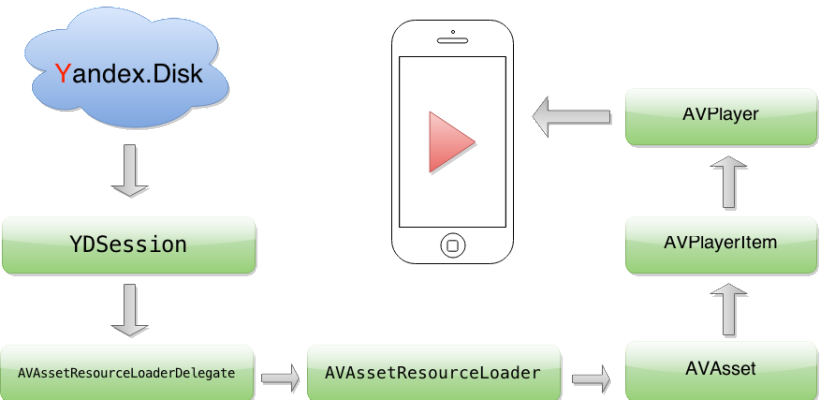
TL;DR: ใช้ AVAssetResourceLoaderDelegate ร่วมกับ URL scheme แบบกำหนดเองเพื่อดักการโหลดทรัพยากรของ AVPlayer ซึ่งช่วยให้คุณเพิ่ม header การยืนยันตัวตนแบบกำหนดเองสำหรับบริการคลาวด์ แคชเสียงลงดิสก์ และควบคุมพฤติกรรมการสตรีม – โดยไม่ต้องเขียน HTTP proxy ในเครื่อง ดูซอร์สโค้ดทั้งหมดได้ที่ GitHub
เหตุใด AVPlayer จึงต้องการ resource loader แบบกำหนดเอง
AVPlayer เล่นเสียงจากไฟล์ในเครื่องและ URL ระยะไกล สำหรับบริการคลาวด์ส่วนใหญ่ (Dropbox, Google Drive, Box) คุณสามารถส่ง URL ดาวน์โหลดตรงได้และการเล่นจะทำงานได้ทันที
อย่างไรก็ตาม บางบริการอย่าง Yandex.Disk และ WebDAV ต้องการ header การยืนยันตัวตนแบบกำหนดเองในคำขอ GET AVPlayer ไม่มีวิธีในตัวในการแทรก header เหล่านี้
วิธีแก้ปัญหา: ใช้คุณสมบัติ resourceLoader ของ AVURLAsset API นี้จะดักคำขอการโหลดทรัพยากร ทำหน้าที่เหมือน HTTP proxy ในเครื่องโดยไม่มีความซับซ้อน
วิธีการทำงาน
AVPlayer ใช้ resourceLoader เมื่อไม่รู้จัก URL scheme โดยการแทนที่ https:// ด้วย scheme แบบกำหนดเอง (เช่น customscheme://) คุณจะบังคับให้ AVPlayer มอบการโหลดทั้งหมดให้แอปของคุณ
คุณต้องใช้เมธอด AVAssetResourceLoaderDelegate สองเมธอด:
resourceLoader:shouldWaitForLoadingOfRequestedResource:– ถูกเรียกเมื่อ AVPlayer ต้องการข้อมูล บันทึกAVAssetResourceLoadingRequestและเริ่มการดำเนินการโหลดข้อมูลของคุณresourceLoader:didCancelLoadingRequest:– ถูกเรียกเมื่อคำขอถูกยกเลิกหรือถูกแทนที่
วิธีสร้าง AVPlayer แบบกำหนดเอง
ตั้งค่า AVPlayer ด้วย URL scheme แบบกำหนดเอง:
NSURL *url = [NSURL URLWithString:@"customscheme://host/audio.mp3"];
AVURLAsset *asset = [AVURLAsset URLAssetWithURL:url options:nil];
[asset.resourceLoader setDelegate:self queue:dispatch_get_main_queue()];
AVPlayerItem *item = [AVPlayerItem playerItemWithAsset:asset];
[self addObserversForPlayerItem:item];
self.player = [AVPlayer playerWithPlayerItem:item];
[self addObserversForPlayer];
โค้ดนี้:
- กำหนด URL ด้วย scheme แบบกำหนดเองของคุณ
- สร้าง
AVURLAssetพร้อม delegate บน main queue - สร้าง
AVPlayerItemจาก asset - เริ่มต้น
AVPlayer
การใช้งาน resource loader delegate
สร้างคลาส LSFilePlayerResourceLoader เพื่อจัดการการดึงข้อมูลจากเซิร์ฟเวอร์และส่งกลับไปยัง AVURLAsset จัดเก็บอินสแตนซ์ loader ในพจนานุกรมโดยใช้ URL ของทรัพยากรเป็นคีย์
- (BOOL)resourceLoader:(AVAssetResourceLoader *)resourceLoader shouldWaitForLoadingOfRequestedResource:(AVAssetResourceLoadingRequest *)loadingRequest {
    NSURL *resourceURL = [loadingRequest.request URL];
    if ([resourceURL.scheme isEqualToString:@"customscheme"]) {
        LSFilePlayerResourceLoader *loader =
        [self resourceLoaderForRequest:loadingRequest];
        if (!loader) {
            loader = [[LSFilePlayerResourceLoader alloc] initWithResourceURL:resourceURL session:self.session];
            loader.delegate = self;
            [self.resourceLoaders setObject:loader forKey:[self keyForResourceLoaderWithURL:resourceURL]];
        }
        [loader addRequest:loadingRequest];
        return YES;
    }
    return NO;
}

- (void)resourceLoader:(AVAssetResourceLoader *)resourceLoader didCancelLoadingRequest:(AVAssetResourceLoadingRequest *)loadingRequest {
    LSFilePlayerResourceLoader *loader = [self resourceLoaderForRequest:loadingRequest];
    [loader removeRequest:loadingRequest];
}
เมธอดเหล่านี้ตรวจสอบ URL scheme สร้างหรือดึง loader และเพิ่มคำขอในคิวของ loader scheme ที่ไม่รู้จักจะคืนค่า NO
อินเทอร์เฟซ LSFilePlayerResourceLoader
@interface LSFilePlayerResourceLoader : NSObject

@property (nonatomic, readonly, strong) NSURL *resourceURL;
@property (nonatomic, readonly) NSArray *requests;
@property (nonatomic, readonly, strong) YDSession *session;
@property (nonatomic, readonly, assign) BOOL isCancelled;
@property (nonatomic, weak) id<LSFilePlayerResourceLoaderDelegate> delegate;

- (instancetype)initWithResourceURL:(NSURL *)url session:(YDSession *)session;
- (void)addRequest:(AVAssetResourceLoadingRequest *)loadingRequest;
- (void)removeRequest:(AVAssetResourceLoadingRequest *)loadingRequest;
- (void)cancel;

@end

@protocol LSFilePlayerResourceLoaderDelegate <NSObject>

@optional
- (void)filePlayerResourceLoader:(LSFilePlayerResourceLoader *)resourceLoader didFailWithError:(NSError *)error;
- (void)filePlayerResourceLoader:(LSFilePlayerResourceLoader *)resourceLoader didLoadResource:(NSURL *)resourceURL;

@end
การโหลดข้อมูล: กระบวนการสองขั้นตอน
เมื่อคำขอการโหลดเข้าสู่คิว จะมีการดำเนินการสองอย่างตามลำดับ:
- contentInfoOperation – สอบถามความยาวของเนื้อหา ประเภท MIME และการรองรับช่วงไบต์
- dataOperation – ดึงข้อมูลไฟล์เริ่มจาก
requestedOffset
กลยุทธ์การแคชลงดิสก์
ข้อมูลที่ดาวน์โหลดจะถูกเขียนลงในไฟล์ชั่วคราวบนดิสก์ คำขอถัดไปสำหรับเนื้อหาเดียวกันจะได้รับการบริการจากแคชนี้ หลีกเลี่ยงการเรียกเครือข่ายซ้ำซ้อน วิธีนี้:
- ลดการใช้แบนด์วิดท์
- เปิดใช้การเล่นซ้ำได้เกือบทันที
- รองรับการค้นหาภายในช่วงที่แคชไว้
การประมวลผลคำขอที่รอดำเนินการ
เมธอด processPendingRequests จะเติม contentInformationRequest ของแต่ละคำขอด้วยข้อมูลเมตาและส่งช่วงไบต์ที่แคชไว้ คำขอที่เสร็จสมบูรณ์จะถูกลบออกจากคิว
ซอร์สโค้ดและขั้นตอนถัดไป
บทช่วยสอนนี้ให้ภาพรวมระดับสูงของการใช้งาน AVAssetResourceLoaderDelegate สำหรับการสตรีมเสียงบนคลาวด์พร้อม header การยืนยันตัวตนแบบกำหนดเอง ดูซอร์สโค้ดทั้งหมดได้ที่ GitHub
แนวทางนี้ขับเคลื่อนเอนจินสตรีมเสียงใน Evermusic ซึ่งสตรีมเพลงจาก Dropbox, Google Drive, OneDrive, Yandex.Disk และบริการคลาวด์อื่น ๆ บน iOS และ macOS
คำถามที่พบบ่อย
ควรใช้ AVAssetResourceLoaderDelegate แทน URL โดยตรงเมื่อใด?
วิธีนี้ใช้กับ Swift ได้หรือไม่?
AVAssetResourceLoaderDelegate ทำงานในลักษณะเดียวกันใน Swift ตัวอย่าง Objective-C ที่นี่สามารถแปลได้โดยตรง
ใช้สิ่งนี้สำหรับการสตรีมวิดีโอได้หรือไม่?
AVAssetResourceLoaderDelegate ทำงานกับสื่อทุกประเภทที่ AVPlayer รองรับ รวมถึงวิดีโอ วิธี custom scheme เดียวกันใช้ได้
รองรับการเล่นเสียงในพื้นหลังหรือไม่?
AVAudioSession อย่างถูกต้อง